Sunday, 16 November 2014


Follow Storage Area Network... 
--------
The research has been completed on the time and fulfills all the below objectives:

1- For the first objective which is snapshot and advantages of SAN has been given.

2- For the architectures of SAN: layer of SAN network with the figure has given an idea about SAN architectures.

3- For the techniques that SAN uses: Three techniques explained briefly, supported with figures for each techniques , although Fiber channel techniques consider as the best due to speed and data transfer of Fiber.

4- For topologies of SAN: four topologies mentioned and explained, supported with figures for each topologies.

5- For the recommendations,  the bellow points should be taken into consideration when SAN establish:
-          Appropriate cables for the wanted network and ensure that each cable must has the same data transfer speed, for the best cable is “Fiber Optic “.
-           Determine the network needed speed, so on that we can select the appropriate equipments.
-           Choose good quality hardware, switches for the most should be chosen carefully, often core switch such “Cisco Catalyst 4500E” is needed for high speed network.


  -References 
[1] Lippitt M, Smith E, "Network Storage Concepts and protocols TechBook", 2008.
[2] Norman D, "Fiber Channel Technology For Storage Area Networks".

Wednesday, 12 November 2014

4 November-12 November

This is what i  have done with SAN research until now.
The information of this research from references "will be written down when i finish ". 
The research duration end by 16 of October.. 
------------------------------------------------------------------------------------------------------------


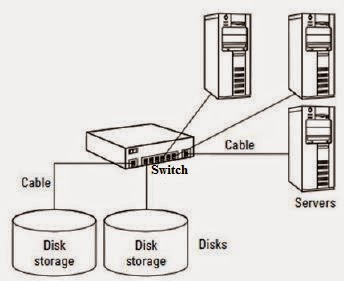
Storage area network is type of network which a group of servers is connected via high speed cable with storage unit “Disk array”.

The main purpose of this Network is to keep the data storage safely from users’ PCs or servers with separated storage units, so any damages happen to the servers will not affect on the data.
The below figure show simple of SAN: 

Advantages of SAN,
            -High speed data transmission by using Fiber Optic Channel.
            -Central storage units allow many servers to access at the same time.
            -Secured technique for saving data, due to data isolated far of servers damages risk.
            - Minimize the number of servers used, instead of assigning file server for each network.
            - Easy data access with time saved.
            -This technology allows connecting servers with different OS such as, Red hat, Win…etc.

Storage area network Layers, 

SAN consist of 3 layers which are:
            -Host layer, user’s PC or servers
-Fiber layer, the middle layer which connects the PCs, servers with storage unites via routers,  switches or hubs.
            -Storage layer, which is the storage unit. 


Techniques of SAN: 
There are so many techniques of SAN in here some of that techniques.
1-      Small Computer System Interface SCSI, this technique is a parallel communication where several bits are sent as a whole, on a link with several parallel channels. This is contrast to serial communication where data sent one bit at a time. SCSI could transmit data as 160Mbps within maximum distance 25m, but it consider as an old technique, because it allows to be connected with limited number of servers.

 2-      Fiber channel, this technique is high speed technology used to connect computer data storage, as well it consider as very speed connection type for storage area network.  So fiber optic cables is used to connect data storage units with servers where 10Gbps is the maximum rate of data transmission, due to that high rate of data transmission with fiber optic, it recommended if we have live stream conference and we want to video record at the time sending the recorded video to the storage units.
3-Disk array is data storage system that contains multiple disk storage, cache memory and controller.
 There is some of the disk storage leave empty so that, if one of the storage unit becomes full, the controller efficiently distributes the coming data across the empty storage while cache faster the process of data storage. 
Topologies of SAN,
There are physical topology and logical topology for the environment of fiber channel.
The logical topology is the path established between the operation system with devices “switch or hub” and the associated storage ports.
The physical topology is, interconnects among devices “storage units, switches, servers…”
The figure below describes with more details:


1-      Point to point topology, 
      consider as the simple design, in short it’s a server connects with disk storage, means no need for a fiber layer. Within this topology many servers can connect with the storage unites depends on the storage unit ports.


2-      Arbitrated loop topology,
This type of topology has fiber layer, where fiber channel hub used to connect between the servers and storage unit. But as the Hub is not efficient and old to be used switch is the replaced.   
 -------------------------------------------------------------------------


Monday, 3 November 2014


I have been assigned for new project which is "SAN" Storage Area Network.
The outcomes should be:-

First, Snapshot about SAN  and what is the advantages.
Secand: Find the architectures of SAN.
Third: Find more than two techniques and what is the best.
fourth: Find the topologies of SAN.
Last : Recommended standards should be taken for establishing San.
Start from today read and find references about this projects.

Sunday, 2 November 2014


System admin in IT operation is in charge on managing the local area network in the company.
Some of the tasks that system admin responsible are:
- Installing and configuring system hardware and software such as"Servers"
-managing multi-users computing environment, like LAN
-managing users account and privileges of each unit and each user as individuals.
-upgrading the softwares.
-Data backup and recovery tasks.

The new thing that we learnt is how to install windows server 2008 and we have been assigned to install win server 2008.
 Hardware requirements for installing win server 2008 as minimum we needs:
2GHZ processor
2GB RAM
60GB hard disk

Steps of installation windows server 2008 as follow:

1-insert the CD of windows server 2008
2-reboot the pc
3- Wait until the screen comes up asking to select the installation language, select English then press next
4-press install now
5- Inter the product key
6-after inserting the product key the installation process will determine what kind of windows server you own, otherwise if u didn’t insert the product key, the installation process will ask you which windows server you want to download.
7-choice full version
8- Accept the license terms
9-Select the first disk to install the windows.
10- wait until the installation process reboot the computer
11- CTRL+ALT+DEL to log in
12- Select other user to log in, type administrator then enter
13- You will be asked to change your password
14- Type any hard password and make sure you will not forget it then, press ok.
15- The initial server configuration will come up, such as data and time, configure network, update the server, customize the server...etc so after initial some of that configuration tasks, windows server starts working

Thursday, 30 October 2014

30 October
                                                                            VoIP Server 


In order to create a communication network among the staff for facilitate the way of communicate with one another, OfficeSip Server has been established.

OfficeSip server is an open source application enables users to communicate via session initiation protocol (SIP), which is used for controlling multimedia communication session such as video and voice calls over internet protocol (IP).

1.    1.Implementation
         1.1 Download officesip Server 

1.2    run the service of OfficeSip from the local services 


1.3    Make sure the firewall is not blocking the inbound connection to the server by opening ports 5060 Tcp and 5060 Udp
Go TO windows firewall with advanced security
Inbound rules, add new rules, select ether programme then choice OfficeSip Or choice port then select tcp and udp 5060.


1.4    open OfficeSip server go to csv File to add users click on
                        Username,222( the user name has to be in Number only)
                        User Display name, Test “Any name”
                        Email “any email”                                                                                           
                        Password, 222 “set any password”


1.     2.On the client Side “Mobiles”
We need to configure the SIP :
2.1  Download the SIP client “Sipdroid” to the Mobile 


2.2    set the configuration
              Username, 111
              Password, 111
              Server, 192.168.1.3 which is my laptop IP
              Domain, leave it empty
              Port, 5060
              Protocol, UDP

          2.3 If the inserted configuration on the client side is correct, the user name in the Server side will  change to the green colour.


Sunday, 26 October 2014

I have been assigned to establish Voice Over Internet Protocol

Server “VOIPS”
---------------
-On 19 of October I have a dissection with my supervisor En.Bander in SabaFon  about
establishing VOIP Server project . During the dissection my supervisor explained to me with details what is wanted exactly
1-What VoIP Server they want..?
2-What is the purpose of this server..?
3-Where this server will be used..?
4-Does the server need to be access from outside the network or only in the ring of the Lan..?
The upshot of this dissection and the details i get about this project was as follow:
First, the VoIP server needed in order to facilitate the mobile means of communication among the staff,  the wanted server will be used for making a communication network with the staff Mobile cell phones.
Second, there must be a unique number for each Mobile phone of the Staff, these numbers are giving and managed by the VoIP server ,means that there is not two staff used the same number.
Third, the server must not used any internet connection, only Wifi signals should be used for transmitting the voice and video and connect all the staff mobile phones to the network of VoIP server
Fourth and last, the project must be done within two weeks start by 19 October end with 30 October ,and i have to set this server up with all of the details ,then implement it as a pre_implementation with some of the staff in the department to make sure the server works well and there is no any vulnerability.
So, since my supervisor clearly explained to me what is wanted,
also advice me about some points and references will help me such as SIP protocol.
Since that, I start to read about session initiation protocol "SIP" and find more resource about it.
-19-20 October Read about Sip protocol .
-21-23 October Read about VoIP and find out Sip server .
-24-26 October Read and watch YouTube videos on how to set up OfficeSip server, as well installing and configure OfficeSip server.
------------------------
I found OfficeSip server which provide good quality of
communication, I watched YouTube videos and read some references about VoIP including OfficeSip server, find out  how to install, how to add and manage users for the clients, also how OfficeSip server works.
So far, OfficeSip  server installed and run the service, then i set up the configurations such as opening the used ports by OfficeSip server which are: Tcp5060 Udp5060 and adding the users in the server to be accessed by the clients.
----------------------
What still left are,
a-  Finding a router and configure it in order to connect the clients to the server network  that happning after
passing the identifying and verifying process, as well giving an IP for each client, means  the DHCP has to be active on the router.
b- Finding the client software which going to be installed and configured on the staff phones.
c- Test the server with the staff.
Almost 60% of the project done.

Sunday, 19 October 2014

I assigned for a task which is establishing and finding more details about voice over internet protocol server , this task  should be done within two weeks start by 19 October end with 30 October. So when i finish  this task i will explain with details Inshallah...